3X-UI + Traefik v3 三獨立網域單一 443 埠


1. 流量拓撲與網域職責劃分
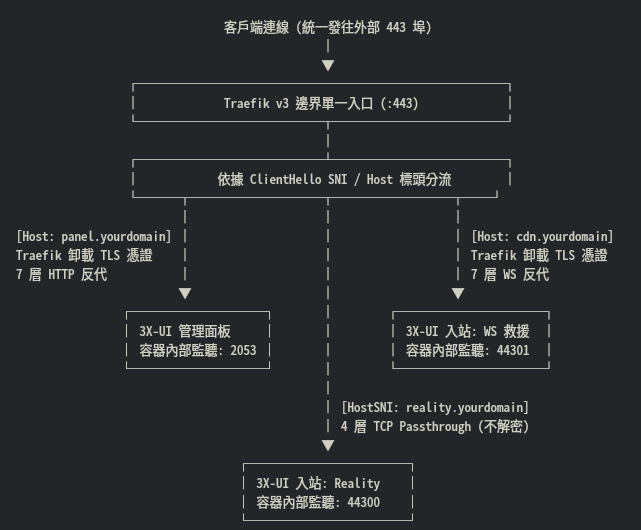
三網域配置對照表
| 獨立網域規劃 | 外部連接埠 | Traefik 分流層級 | TLS 憑證處理者 | 3X-UI 內部監聽埠 | 內部通訊協定 | CDN 代理狀態 |
|---|---|---|---|---|---|---|
panel.yourdomain.com | 443 | 7 層 HTTP | Traefik (Let's Encrypt) | 2053 | 純 HTTP | 灰雲 (DNS Only) 或橘雲 |
reality.yourdomain.com | 443 | 4 層 TCP | 不解密透傳 (Xray 處理) | 44300 | VLESS-Reality | 嚴格灰雲 (DNS Only) |
cdn.yourdomain.com | 443 | 7 層 HTTP/WS | Traefik (Let's Encrypt) | 44301 | 純 WebSocket (明文) | 開啟橘雲 (Proxied) |
2. DNS 解析與 Cloudflare 關鍵配置
在域名託管商(以 Cloudflare 為例)分別新增三筆 A 紀錄指向 VPS 公網 IP:
panel.yourdomain.com   A   <VPS_IP>   DNS Only (或開啟 Proxied,配合 Full SSL)
reality.yourdomain.com A   <VPS_IP>   DNS Only (必須關閉橘雲,否則破壞 TCP 原生握手)
cdn.yourdomain.com     A   <VPS_IP>   Proxied  (開啟橘色小雲朵,隱藏真實 IP)
Cloudflare 控制台核對事項
-
SSL/TLS 模式:切換為 Full 或 Full (Strict)(避免 Cloudflare 連向 Traefik 443 時回傳 520/521 錯誤)。
-
Network:確認 WebSockets 為開啟狀態。
3. Docker Compose 部署配置
在 /opt/3x-ui/docker-compose.yml 中編排,3X-UI 掛載進 Traefik 所在的 proxy-network 外部橋接網路。
services:
  3x-ui:
    image: ghcr.io/mhsanaei/3x-ui:latest
    container_name: 3x-ui
    restart: unless-stopped
    environment:
      - XRAY_VMESS_AEAD_FORCED=false
    volumes:
      - /opt/3x-ui/db:/etc/x-ui
      - /opt/3x-ui/cert:/root/cert
    networks:
      - proxy-network
    labels:
      - "traefik.enable=true"

      # =========================================================================
      # 1. 3X-UI Web 面板 (獨立網域 panel.yourdomain.com -> 內部 2053)
      # =========================================================================
      - "traefik.http.routers.xui-panel.rule=Host(`panel.yourdomain.com`)"
      - "traefik.http.routers.xui-panel.entrypoints=websecure"
      - "traefik.http.routers.xui-panel.tls=true"
      - "traefik.http.routers.xui-panel.tls.certresolver=myresolver"
      - "traefik.http.services.xui-panel.loadbalancer.server.port=2053"

      # =========================================================================
      # 2. VLESS-Reality 直連 (獨立網域 reality.yourdomain.com -> 內部 44300)
      # =========================================================================
      # 關鍵:HostSNI 匹配連線名稱;passthrough=true 禁止 Traefik 解密
      - "traefik.tcp.routers.xui-reality.rule=HostSNI(`reality.yourdomain.com`)"
      - "traefik.tcp.routers.xui-reality.entrypoints=websecure"
      - "traefik.tcp.routers.xui-reality.tls.passthrough=true"
      - "traefik.tcp.services.xui-reality.loadbalancer.server.port=44300"

      # =========================================================================
      # 3. VLESS-WS + CDN 救援 (獨立網域 cdn.yourdomain.com -> 內部 44301)
      # =========================================================================
      # Traefik 負責卸載 TLS,轉發明文 WebSocket 流量給 Xray
      - "traefik.http.routers.xui-ws.rule=Host(`cdn.yourdomain.com`)"
      - "traefik.http.routers.xui-ws.entrypoints=websecure"
      - "traefik.http.routers.xui-ws.tls=true"
      - "traefik.http.routers.xui-ws.tls.certresolver=myresolver"
      - "traefik.http.services.xui-ws.loadbalancer.server.port=44301"

networks:
  proxy-network:
    external: true
啟動容器:
docker compose -f /opt/3x-ui/docker-compose.yml up -d
4. 3X-UI 入站節點 (Inbounds) 設定細節
瀏覽器開啟 [https://panel.yourdomain.com](https://panel.yourdomain.com) 登入面板,前往 Inbounds (入站列表) 新增兩個節點:
4.1 入站一:VLESS-Reality (內部埠 44300)
-
Remark:
Reality-Direct-44300 -
Protocol:
vless -
Listening IP:
0.0.0.0 -
Port:
44300(與 Compose TCP 服務宣告之埠號相符) -
Flow:
xtls-rprx-vision -
Security:
Reality -
uTLS:
chrome -
Dest:
reality.yourdomain.com:443(或swdist.apple.com:443) -
Server Names (SNI):
reality.yourdomain.com(必須與 Traefik Labels 的HostSNI完全一致) -
Private Key / Public Key:點擊生成並記錄公鑰
-
Short IDs:點擊生成
4.2 入站二:VLESS-WS+CDN 救援 (內部埠 44301)
-
Remark:
WS-CDN-Rescue-44301 -
Protocol:
vless -
Listening IP:
0.0.0.0 -
Port:
44301(與 Compose HTTP 服務宣告之埠號相符) -
Network:
ws -
Path:
/ray-ws-stream -
Security:
none(關鍵:Traefik 邊界已完成 TLS 憑證解密,容器內嚴禁再開 TLS)
5. 客戶端配置參照
無論內部監聽的是 44300 還是 44301,對外客戶端填寫的伺服器埠號皆為標準 443。
5.1 Reality 客戶端設定 (直連高速)
vless://<UUID>@reality.yourdomain.com:443?type=tcp&security=reality&pbk=<PUBLIC_KEY>&fp=chrome&sni=reality.yourdomain.com&sid=<SHORT_ID>&flow=xtls-rprx-vision#Reality-Direct
-
Address:
reality.yourdomain.com -
Port:
443 -
Security:
reality -
SNI:
reality.yourdomain.com -
Flow:
xtls-rprx-vision
5.2 WS + CDN 客戶端設定 (防封救援)
vless://<UUID>@cdn.yourdomain.com:443?type=ws&security=tls&sni=cdn.yourdomain.com&path=%2Fray-ws-stream#CDN-Rescue
-
Address:
cdn.yourdomain.com(若遇阻斷可替換為 Cloudflare 優選 IP) -
Port:
443 -
Security:
tls -
SNI / Host:
cdn.yourdomain.com -
Path:
/ray-ws-stream
6. 排障核心檢驗
-
Reality 握手超時 (Timeout):
-
檢查 Cloudflare 是否為
reality.yourdomain.com開啟了橘雲。此網域必須保持灰色雲朵 (DNS Only)。 -
檢查客戶端填寫的 SNI 是否與 Traefik Label 中的
HostSNI完全一致。
-
-
WS 節點跳出 502 Bad Gateway:
- 檢查 3X-UI 後台 44301 入站的
Security是否誤設為tls。外層已有 Traefik 卸載憑證,容器端必須設為none。
- 檢查 3X-UI 後台 44301 入站的
-
面板無法登入:
- 檢查 Traefik 的 ACME 憑證申請狀態,確認
panel.yourdomain.com已順利簽發 Let's Encrypt 憑證。
- 檢查 Traefik 的 ACME 憑證申請狀態,確認